

Order
An Order represents a structured request from a partner to purchase or terminate specific products or services. Orders are crucial for enabling automated service provisioning and lifecycle management while ensuring alignment with customer expectations and business capabilities.
Orders specify the details of what the customer wants, including the requested actions, associated products or services, and any required configurations or parameters. These are typically aligned with product offerings, which can include:
-
Plans: Core subscription offerings that include foundational elements such as phone numbers, network configurations, and other essential service features. These serve as the primary subscription for the customer.
-
Add-ons: Optional, value-added services that extend the functionality of a plan. These are dependent on an active plan and provide additional features tailored to customer needs, such as extra data, international calling, or premium services.
Types of Orders
-
activate_subscription- Purpose: To activate a new subscription.
- Includes:
- Plan: Required (only one can be selected).
- Add-ons: Optional.
- Up to 15 data add-ons.
- Up to 1 voice add-on of each type.
- Use Case: A customer wants to start a new service with a chosen plan and additional features, such as extra data or voice packages.
-
topup_subscription- Purpose: To add or enhance an existing subscription.
- Includes:
- Plan: Optional; a plan can be included if needed.
- Add-ons: Optional.
- Up to 15 data add-ons.
- Up to 1 voice add-on of each type.
- Use Case: A customer needs to add extra data, voice minutes, or other features to their current subscription.
-
cancel_subscription- Purpose: To terminate an existing subscription.
- Includes: No plans or add-ons; it applies to the entire subscription.
- Use Case: A customer no longer requires the service and wants to cancel their subscription.
-
swap_subscription_sim- Purpose: To swap SIM of an existing subscription.
- Includes: No plans or add-ons; it applies to the entire subscription.
- Use Case: A customer lost access to his SIM and needs new one.
-
change_subscription_plan- Purpose: To change the plan of an existing subscription.
- Includes:
- Plan: Required (only one can be selected). Specifies the new plan to switch to.
- Use Case: A customer currently on a "Standard" monthly plan wants to upgrade to a "Premium" plan for additional features. The API checks eligibility, calculates any applicable prorated charge or refund, and updates the subscription accordingly without service interruption.
-
cancel_subscription_products- Purpose: To cancel one or more products within an existing subscription without canceling the subscription itself.
- Use Case: A customer wants to drop specific add-ons from their subscription while keeping the Plan active.
-
enable_subscription_policies/disable_subscription_policies- Purpose: To enable or disable one or more policies on an existing subscription.
- Use Case: A partner activates or deactivates a configurable policy for the subscription.
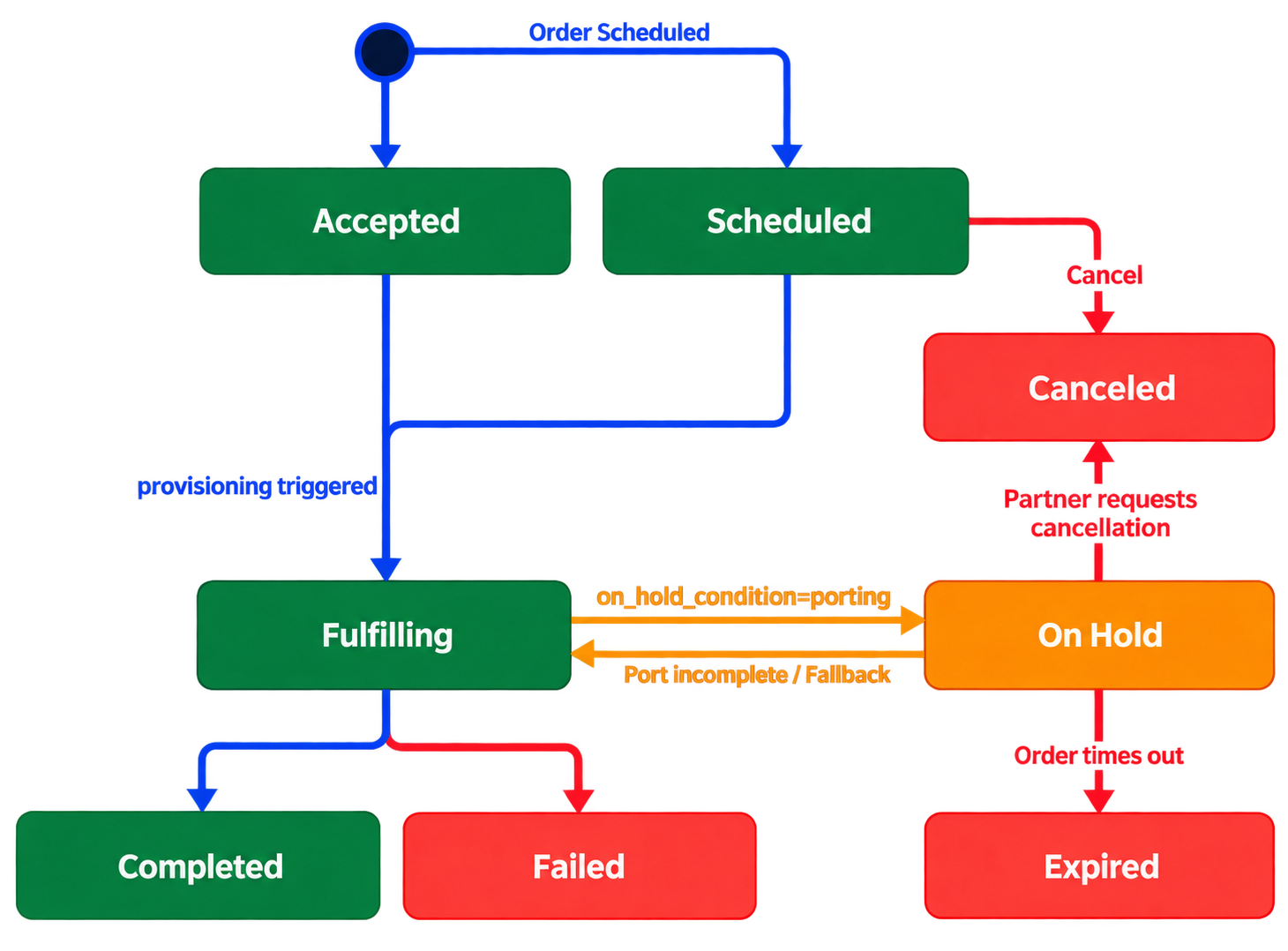
Order Lifecycle
API Reference
See the full list of endpoints, request and response schemas, examples, and version information in the Orders section of the API Reference.